
What is the Photo Sharing Library?
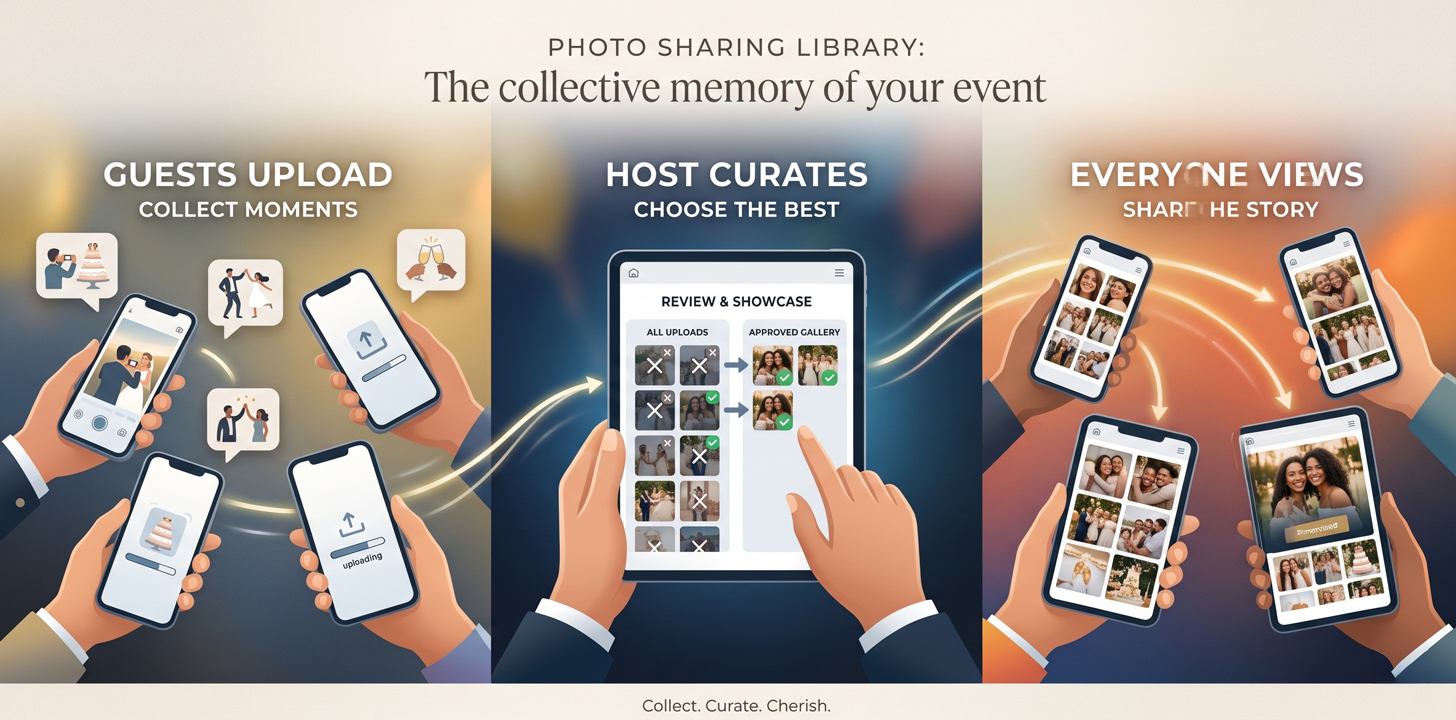
The Photo Sharing Library is a Nimto add-on that gives every event its own dedicated photo space. Hosts can collect photos from all their attendees, review them, and choose which ones to showcase — creating a curated, shared gallery that every guest can browse and download long after the event is over.
No third-party apps. No group chats. No "can you send me that photo?" messages days later. Just one organised, beautiful space for every memory from your event.
Bring this to life
Create this style in Nimto
Jump to templates already aligned with this article's theme and customize in minutes.
Start designing nowDesigned for real events. Whether you're hosting a wedding, a birthday celebration, a corporate gathering, or an intimate dinner — the Photo Sharing Library fits every occasion where memories matter.
How it works — start to finish
The entire flow is built to be effortless for both you and your guests. Here's how it comes together:
- Add the Photo Library to your eventWhen setting up your event on Nimto, simply enable the Photo Sharing Library add-on. That's it — your event now has its own dedicated photo space ready to go.
- Share your QR code or link with guestsAt the event, display the QR code on a table card, a welcome screen, or the entrance. You can also share the direct link ahead of time in your event communications — giving guests the heads-up to bring their cameras and snap away.
- Guests upload their photosAttendees tap the link or scan the QR code, sign in or create an account using the same email they RSVPd with, and upload their favourite shots from the event. Simple, secure, and open to all your confirmed guests.
- You review and select the highlightsOnce photos start coming in, you get to go through them and choose which ones to move into the Showcase. This is your curation moment — only the photos you approve will be visible to all attendees. No surprises, no unwanted shots going live without your say-so.
- Everyone views and downloadsOnce showcased, your curated gallery is available to every attendee. They can browse the full collection, relive the moments they missed, and download any photo they love — completely free.
What's in it for everyone
For hosts
You stay in control of the story
- Collect photos from all guests in one place
- Review everything before it goes public
- Showcase only the moments you love
- No more chasing people across group chats
- A lasting, professional gallery of your event
- One QR code handles everything on the day
For attendees
You get the full picture
- Contribute your own best shots easily
- See moments you weren't there to capture
- Download any photo from the gallery for free
- No app to install — just sign in and go
- Relive the event long after it's over
- Feel part of a shared, collective memory
"The best photos from your event are sitting in someone else's camera roll. The Photo Sharing Library brings them home."
The moment that makes it worth it
There's something special that happens when an event host opens their Photo Sharing Library a day or two after their event and sees photos they never knew existed.
The photo a guest took of you laughing with an old friend. The shot someone captured of the decorations before anyone arrived. The candid group moment that happened when you stepped away for five minutes. These are the photos you didn't take, couldn't take — but now you have them.
That's what the Photo Sharing Library is really about. It's not just a feature. It's a way of making sure every angle of your event is remembered — not just the ones you happened to be behind the camera for.
Tips for getting the most out of it
📲 Display your QR code where guests can't miss it Put it at the entrance, on each table, or on a welcome board near the main gathering area. The more visible it is, the more photos you'll collect.
✉️ Mention it in your pre-event message Let guests know they'll be contributing to a shared gallery. It's a small nudge that gets people genuinely excited to take photos they'll actually want to share.
🔑 Remind guests to use their RSVP email Guests sign in using the same email they used when they RSVPd. This keeps your library secure — only your confirmed guests can upload and access the gallery.
⏱️ Do your showcase review soon after the event While the memories are fresh and your guests are still buzzing about the day, take a little time to go through the uploads and curate your highlights. It's one of the nicest things you'll do post-event.
📣 Let attendees know when the gallery is live Once you've showcased your picks, share the gallery link with your guests. It's a warm way to close the loop on your event and give everyone something to look forward to after the day.
Your event deserves to be remembered — all of it
At Nimto, we believe that every event is more than just a date on the calendar. It's people coming together, memories being made, and moments that deserve to last beyond the day itself.
The Photo Sharing Library is our way of making sure nothing gets left behind. From the moment your guests arrive to the last photo uploaded days later, your event lives on — beautifully organised, easy to share, and entirely yours to curate.
Because the best events aren't just experienced in the moment. They're relived, again and again, by everyone who was part of them.